
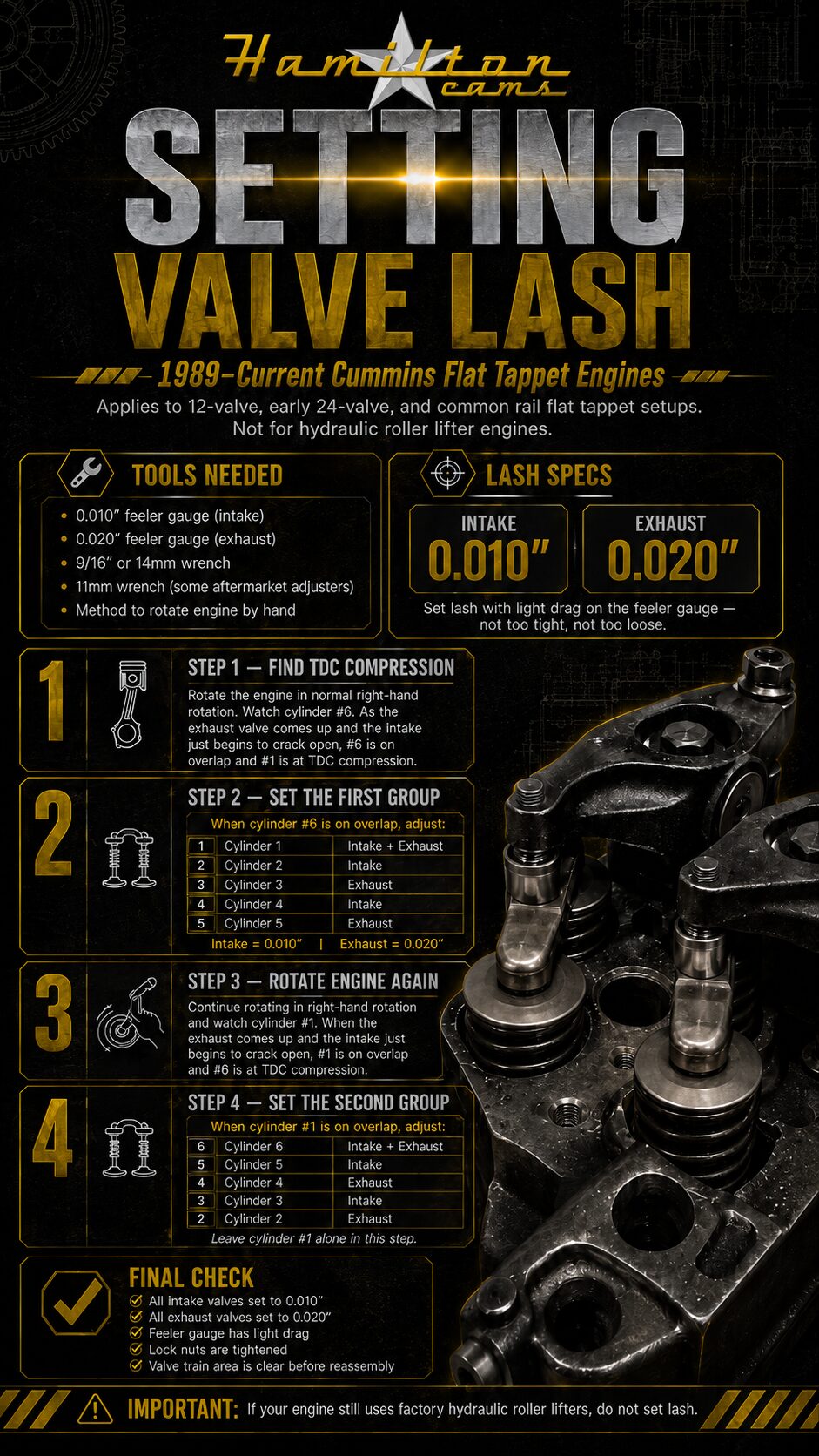
Cheat Sheet
View the reference sheet in a larger window. Use the zoom control to read the details.
Hamilton Cams Resources
Open the cheat sheet for a closer look or watch the cam gear installation video.
View the reference sheet in a larger window. Use the zoom control to read the details.
Watch the installation video with playback controls and a fullscreen option.
Choose View Cheat Sheet to open the reference image. Use Zoom in to inspect small details, Fit to window to return to the full sheet, or Open original to view the source file in a separate tab. Close the viewer when you are ready to return to this page.
Choose Watch Video to open the cam gear installation video. The player includes playback controls and a fullscreen option, so you can pause and review a section at your own pace. Review the complete resource and the instructions supplied with your product before starting work.
Confirm your engine model year, configuration and part number before applying any installation information. For application questions, visit our Frequently Asked Questions or contact Hamilton Cams with your engine and product details. Return to the Dealer Hub for account and order links.